To add an object variable to a data segment, take the following steps:
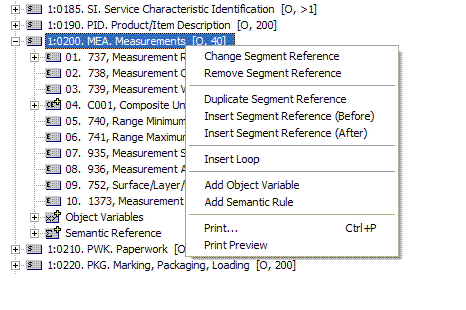
Highlight a data segment, and then right click.
In the popup menu, select the option "Add Object Variable".
In the dialog box, enter a unique name for the new object variable.
The following steps demonstrates how to add an Object Variable to a Data
Segment reference. For example, the Object Variable with the name "MeasurementInfo"
will be added to the Data Segment reference MEA (Measurements). The
segment reference MEA has an ordinal number 22 in the ASC/X12 Transaction
Set 850.
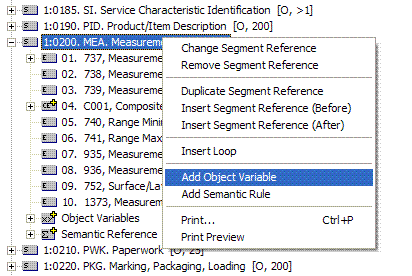
Highlight and right-click the data segment reference where the Object Variable is to be
added.
From the popup menu select "Add Object Variable".
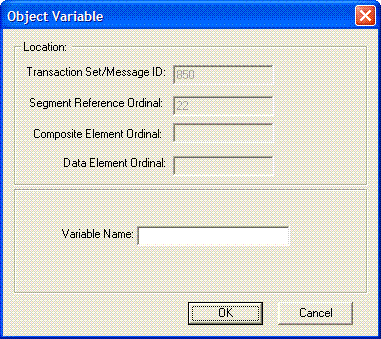
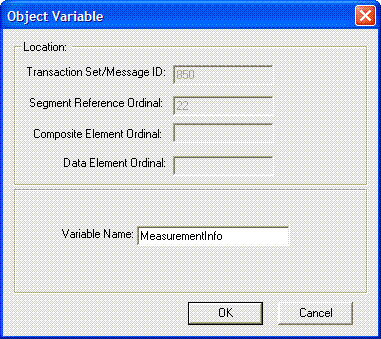
The following dialog box will show.
The Transaction Set/Message ID field displays the ASC/X12 Transaction Set
or UN/EDIFACT Message that the Data Segment reference belongs to. The
Segment Reference Ordinal displays the ordinal number of the Data Segment
reference that the Object Variable will be added to. In the example
shown, the Object Variable is being added to the Data Segment reference at
ordinal 22 in the ASC/X12 Transaction Set 850.
Enter a unique Object Variable name at the edit box "Variable
Name" and then press "OK". In the example shown, the
variable name "MeasurementInfo" has been entered.
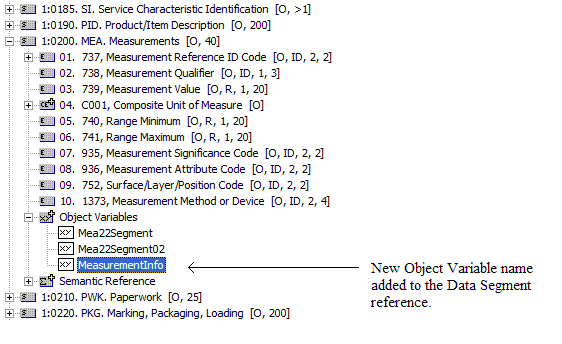
After successfully adding the Object Variable, it will be displayed under
the branch "Object Variables" under the Data Segment
reference. In the example, the variable "MeasurementInfo"
that has been added will show as an addition to other Object Variables that
might have already existed and assigned to the same location.
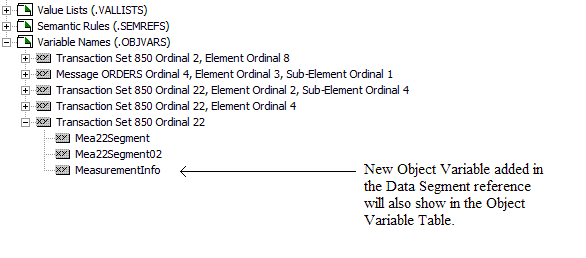
The Object Variable Table will also be updated with the new variable name
just added.