To remove a semantic rule from a composite element, take the following steps:
Expand the selected composite element node.
Expand the node "Semantic Rules" nested under the composite
element node.
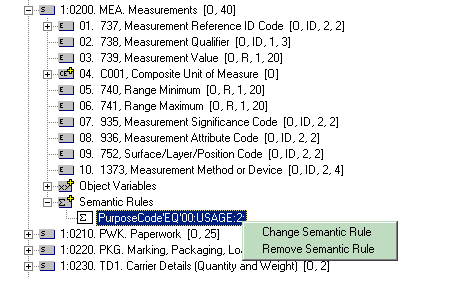
Highlight the semantic rule and then right click.
In the popup menu, select the option "Remove Semantic Rule".
The following steps will demonstrates how to remove a semantic rule from a composite element
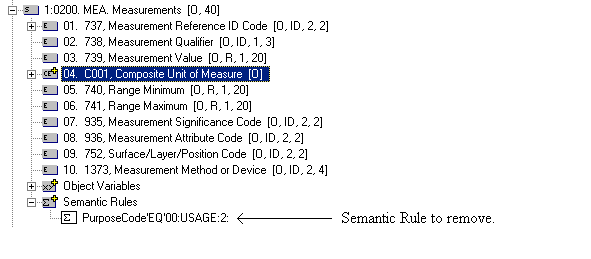
reference. As an example, we will remove the semantic rule "PurposeCode'EQ'00:USAGE:2:"
from the
composite element C001
(Composite Unit of Measure) that has an ordinal number 4 in the data segment MEA
(Measurements), which in turn has an ordinal number 22 in the ASC/X12 Transaction Set
850.
Expand the "Semantic Rules" branch under the composite element reference
from which the semantic rule is to be removed. Then find the semantic rule
from the list.
Highlight the semantic rule name, and then right click to display the
popup menu. In this example, the semantic rule "PurposeCode'EQ'00:USAGE:2:"
has been selected.
Highlight "Remove Semantic Rule" at the popup menu option,
and then click to select the option.
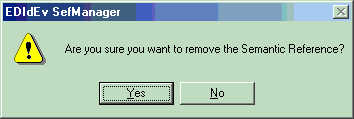
A dialog-box will be displayed to confirm if the semantic rule should
really be removed. NOTE: Removing a semantic rule cannot be
undone once it has been successfully removed.
Click the button "Yes" to remove the semantic rule.
Otherwise click on "No".
If the semantic rule was successfully removed, it should no
longer be displayed in the "Semantic Rules" list. In our example, the semantic rule "PurposeCode'EQ'00:USAGE:2:"
should no longer be listed.
The Semantic Rule Table should also no longer have the semantic rule listed.