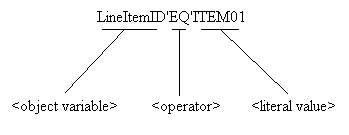
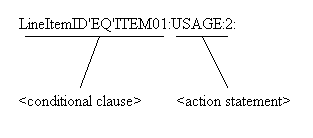
The conditional clause has a logical statement (data element 350 at
LIN1800 is equal to "ITEM01") which must be converted using the
following SEF syntax in the semantic rule:
The Object Variable which must be set up for data element 350 at
LIN1800. For this example, we make up the name of the object variable
to be "LineItemID". For details on adding a variable name to
the data element, refer to Add Object Variable to a Data Element.
The operator "equal to" is matched to 'EQ' from the following
allowed list in SEF:
There are only 4 actions that can be done when the conditional clause is
true, and are of the following type:
USAGE - Dynamically set the user requirement of a data segment, composite
element or data element.
LOCALCODE - Redirect the data element to use a different set of codes.
APPVALUE - Redirect the data element to use a different list of values.
COMEXIT - Run an ActiveX/COM component. Other exit names are allowed
in the SEF standard, but the SEFManager only allows COMEXIT type executable
routines, which are ActiveX/COM components only.
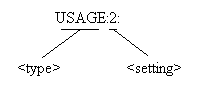
From the action statement (MEA200 must be used) the type of
modification is USAGE. The USAGE type can only have the following setting
value:
"0" for USED.
"1" for NOT USED.
"2" for MUST USE.
"3" for RECOMMENDED.
"4" for NOT RECOMMENDED.
Based on the above list, because this segment "must be used", the
setting is determined to be "2". Therefore, following the SEF
syntax:
<setting action> := <type> ":" <setting>
":"
The SEF syntax for the action clause is as follows: