To add a semantic rule to a data element, take the following steps:
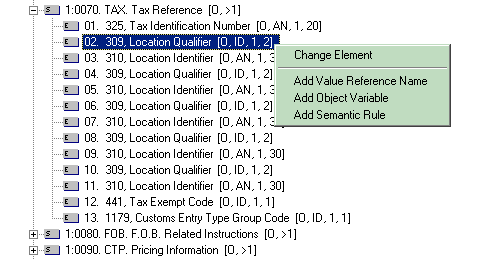
Highlight the selected data element and then right click.
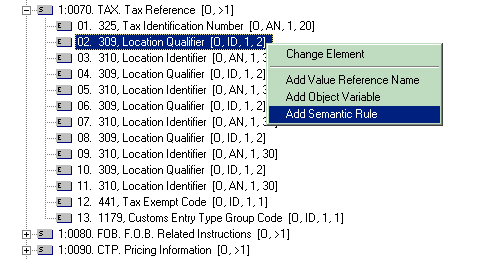
In the popup menu, select "Add Semantic Rule".
In the dialog box, specify the condition and the action of the semantic
rule.
The following steps will demonstrate how to add a semantic rule to a data element reference.
As an example, we will add the semantic rule (see below) to the data element reference 309 (Tax Identification Number)
that has an ordinal number 2 in data segment TAX (Tax Reference), which in turn has an ordinal number 6 in the ASC/X12 Transaction
Set 850.
If data element 355 at BEG200 is equal to "00" then data element
309 at TAX700 must be used
The semantic rule SEF syntax is:
PurposeCode'EQ'00:USAGE:2:
Where:
"PurposeCode'EQ'00:USAGE:2:" is the condition clause.
Highlight and right click the data element reference where the semantic rule is to be
added.
From the popup menu select "Add Semantic Rule".
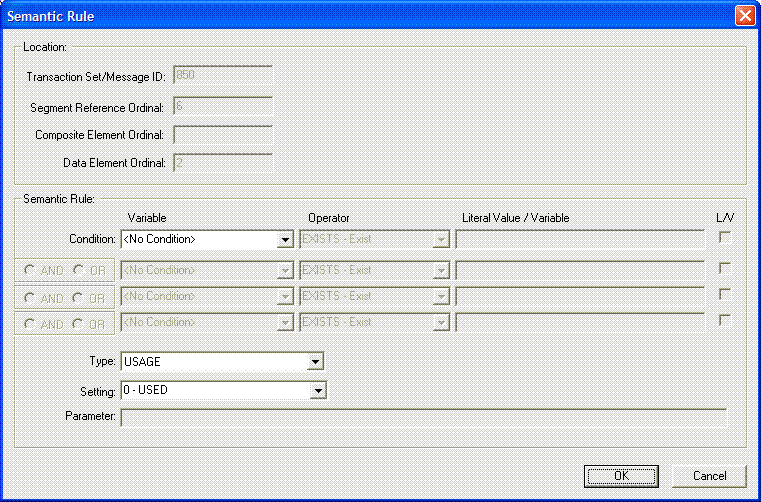
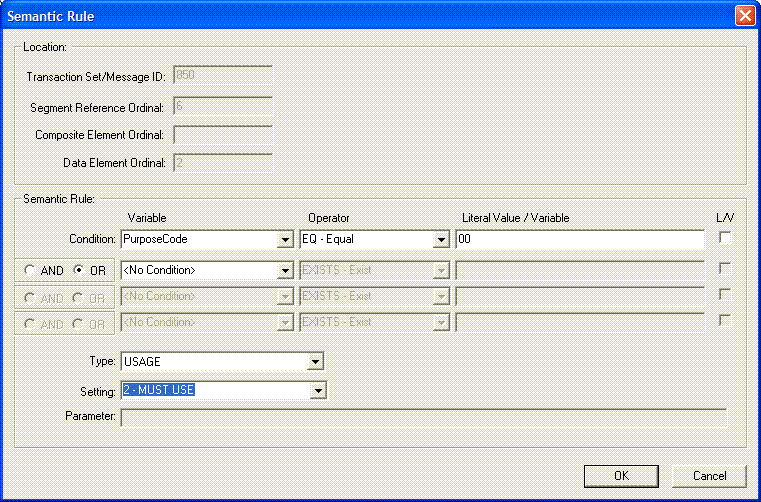
The following dialog box will show.
Location. The Transaction Set/Message ID field displays the ASC/X12 Transaction Set
or UN/EDIFACT Message of the data element. The Segment Reference
Ordinal field displays the ordinal number of the data segment reference
containing the data element to which the semantic rule will be added.
The Data Element Ordinal displays the ordinal number of the data element. In the example shown, the
semantic rule is being added to
the data element with ordinal number 2 in the data segment reference.
The data segment reference is at ordinal 6 in the ASC/X12 Transaction Set
850.
The following semantic fields to enter are:
Condition - Three fields make up the conditional clause of the semantic rule.
They are:
Variable - Enter into this field the object variable name of the
semantic object whose value is to be tested. The drop down
combo box will only list the object variables
available for selection. If the expected object variable is
not in the list, it would have to be added beforehand. For
additional information on how to add an object variable, see the
topic Object
Variables. If there is no condition for the
semantic rule, select the item <No Condition>. This
means that the action clause of this semantic rule will always be
executed whenever the object is encountered.
Operator - For the conditional clause, the following operators are
available and are listed in the combo box for selection:
EQ - Equal
NE - Not Equal
GT - Greater Than
GE - Greater Than or Equal
LT - Less Than
LE - Less Than or Equal
EXISTS - Exist
NEXIST - Not Exist
Literal Value / Variable - Enter into this field the following:
A literal value that will be compared
against the value of the object variable specified above. Quotes should not be included
unless it is part of the value.
An object variable whose value is compared to the value of the
previous object variable specified above.
L/V (Check box) - This check box indicates if the string entered
in the edit box "Literal Value / Variable" above is either
a literal value or an object variable. If unchecked, the
string is accepted as a literal value. If checked, the string
is accepted as an object variable. A list of existing object
variables are displayed for selection.
There is no limit to the number of conditions a semantic rule can
contain. The SefManager, however, limits the number of conditions
to 4. Each condition is linked to the other by a logical AND / OR
operator, and all conditions must result to TRUE for the action to be
executed.
Type - Enter into this field the type of modification to make should the conditional clause
result to TRUE. These are:
APPVALUE - Specifies the Value List to reference if the
conditional clause is true.
COMEXIT - Specifies the ActiveX/COM interface and the method to
execute if the conditional clause is true.
LOCALCODE - Specifies the number of the code set to use if the
conditional clause is true.
USAGE - Specifies the user requirement of the object if the
conditional clause is true.
Setting/Program.Function - Enter into this field the value to modify the object depending on
the Type selected above:
For APPVALUE, a list of all the list in the Value Lists table is
displayed in the combo-box for selection.
For COMEXIT, enter the ActiveX/COM program ID and method to execute.
It must have the following syntax:
<program identifier>.<method
name>.
Example, "FrediTester.Sample.Test". Where "FrediTester.Sample"
is the program ID of the interface and "Test" is the
method to execute in the interface.
For LOCALCODE, enter the number of the code set.
For USAGE, the following is displayed in the combo-box for
selection:
"0 - USED"
"1 - NOT USED"
"2 - MUST USE"
"3 - RECOMMENDED"
"4 - NOT RECOMMENDED"
Parameter - This field applies only if the modification Type is
COMEXIT. If there is no parameter to pass to the method then leave
this field blank. Otherwise, enter into this field the string parameter to pass to the ActiveX/COM method for
execution. The value entered in this field is passed as a single
string to the method. For example, if the value 1,2,3 was entered,
then the single string "1,2,3" is passed to the method.
One or more object variables can be embedded within the parameter string
if the variable names are preceded with the character '@'. In this
case, the variable name in the string is replaced with the value of the
object variable before passing the string to the method. For
example, if the parameter has the following string:
1,2,@NAME,5
If the object variable NAME has the value "John Smith",
then the string parameter is passed to the method as:
1,2,John Smith,5
Please note that the ActiveX/COM method must be able to accept a
single string as an input parameter.
In the example scenario, enter the following data in their respective fields, and then click
"OK" to accept the entries.
Condition: PurposeCode'EQ'00:USAGE:2:
Type: USAGE
Setting: 2
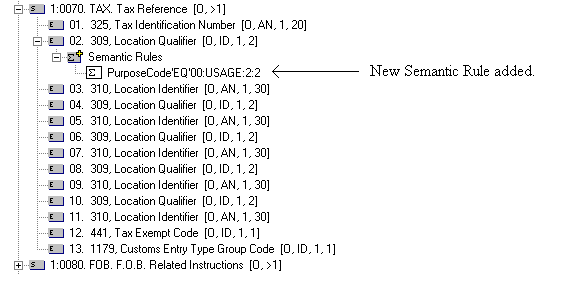
If the semantic rule was added successfully, it will be displayed under
the branch "Semantic Rules" under the data segment reference. In
this example, the semantic rule "PurposeCode'EQ'00:USAGE:2:", which has
just been added, will show in addition with the other existing semantic rules that
were assigned to the same location.
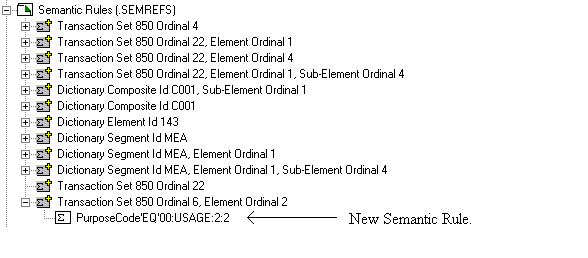
The Semantic Rules Table will also be updated with the new semantic rule
that was just added.